Hamamoto, TIMEWELL.
"Where did that procedure document go?" "I don't know how my predecessor did this." Sound familiar? According to IDC Japan research, knowledge workers spend about 20% of their working time searching for information. Over 240 working days, that's roughly 48 days per person per year — lost to looking for things.
This article covers the full process for building and embedding an internal knowledge base from scratch, organized into 7 steps. The tool selection criteria matrix and operating rules template are ready to use as-is. It also digs into how to avoid the most common trap: building something nobody actually uses.
What Is a Knowledge Base, Exactly?
A knowledge base is an information infrastructure that organizes and accumulates the knowledge and expertise needed for business operations — and makes it accessible to anyone in the organization. Think of it as a digital, searchable version of a physical manual shelf.
Some similar terms often get confused, so let's clarify:
| Term | Primary Use | Key Feature | Examples |
|---|---|---|---|
| Knowledge Base | Systematic accumulation and retrieval of operational knowledge | Structured information; search-oriented | ZEROCK, Confluence |
| Internal Wiki | Collaboratively managed documents | High flexibility; version history | NotePM, Notion |
| FAQ | List of common questions and answers | For handling routine inquiries | Zendesk, Helpfeel |
| File Server | File-level storage and sharing | Folder hierarchy; poor searchability | SharePoint, Google Drive |
| Groupware | Communication and schedule management | Primarily manages information flow | Teams, Slack |
The core of a knowledge base is "a system that gets the right information to the right person at the right time." The goal isn't installing a tool — it's building a system where information actually circulates. Without this foundation, you'll constantly second-guess decisions along the way.
Why Building a Knowledge Base Is Urgent Right Now
Three factors are driving this.
Staff turnover is erasing institutional knowledge
When experienced employees leave — and job mobility is now the norm — they take expertise with them. Komatsu deployed a knowledge base in its legal department and cut contract review time by 40%. Annual contract consultations grew from 200 to 3,000. These numbers show exactly how costly knowledge silos have become.
AI use requires a foundation
To apply generative AI to internal operations, company information must first be digitized and structured. Building an internal AI with RAG won't produce accurate responses if the underlying data is scattered and disorganized. A knowledge base is a prerequisite for meaningful AI adoption.
Remote work is permanent
In an environment where you can't lean over and ask the person next to you, employees need to access information through self-service — or work grinds to a halt.
Struggling with AI adoption?
We have prepared materials covering ZEROCK case studies and implementation methods.
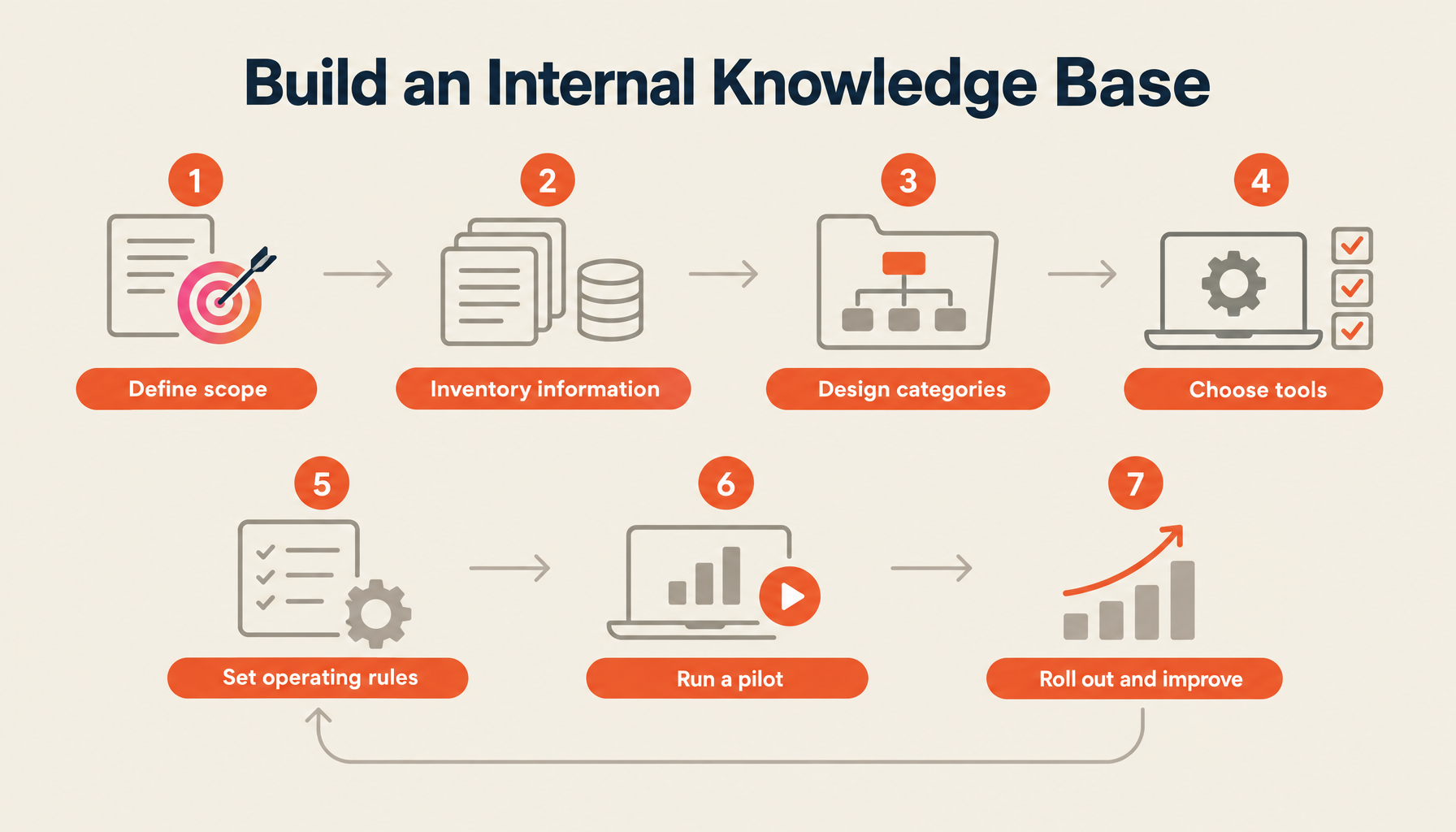
The 7-Step Process
Step 1: Define Purpose and Scope
Start here. Get clear on "why are we building this, and for whom." Without clarity on this, your information architecture will be fuzzy, the structure will be unclear, and you'll end up with a knowledge base nobody uses.
Answer these three questions:
- Who uses it? (Entire company, a specific department, a specific role?)
- What problem does it solve? (Reduce support requests, shorten onboarding, prevent knowledge silos?)
- What does success look like? (Search utilization rate, reduction in support ticket volume, user satisfaction?)
The common mistake is spreading too wide — "let's put all company information in there." Start with one department and one problem. That's the path to sustainable momentum.
Step 2: Inventory Your Existing Information Assets
List everything. File servers, email, chat, individual PCs, paper documents — nothing is exempt.
Sample inventory sheet:
| Information Type | Location | Count (Estimate) | Update Frequency | Current Owner | Priority |
|---|---|---|---|---|---|
| Product manuals | File server | 120 | Quarterly | Tech Dept, Tanaka | High |
| Sales FAQ | Personal notes | Unknown | As needed | Siloed | High |
| Internal policies | Paper binders | 30 | Annually | Admin, Sato | Medium |
| Incident response records | Scattered | As needed | Siloed | High | |
| Training materials | Google Drive | 50 | Twice yearly | HR, Suzuki | Low |
This process surfaces "outdated and unusable information" and "duplicate content." How much you can clean up before building determines the quality of what you end up with.
Step 3: Design the Category Structure
How do you organize what you've inventoried? Getting this wrong is hard to undo later, so it's worth taking time here.
Three principles for category design:
- Maximum three levels deep. Anything deeper and people can't find their way to it
- Design from the user's perspective — not the administrator's. Match how someone looking for information would think about it
- Never create an "Other" category. When things start accumulating there, it's a signal to redesign
Example structure:
├── Products & Services
│   ├── Product A
│   ├── Product B
│   └── Pricing
├── Business Processes
│   ├── Order Flow
│   ├── Billing
│   └── Complaint Handling
├── Internal Policies & Procedures
│   ├── Attendance & Leave
│   ├── Expense Claims
│   └── Information Security
└── Technical Information
    ├── Development Environment
    ├── Infrastructure
    └── Troubleshooting
Step 4: Select a Tool
Now, finally, it's time to choose a tool. Setting evaluation criteria in advance means you won't be pushed around by vendor sales pitches.
| Evaluation Criterion | Weight | What to Verify | How to Evaluate |
|---|---|---|---|
| Search capability | High | Full-text, fuzzy, and AI search support | Actually search with demo data |
| Ease of use | High | How easy it is to create and edit articles | Have non-IT staff trial it |
| Access controls | Medium | Department-level and role-level permissions | Align with security requirements |
| Integrations | Medium | Slack, Teams, Google Workspace connections | Verify connections with existing tools |
| AI features | High | AI-generated answers, summarization, recommendations | Test answer accuracy with real data |
| Total cost | Medium | Initial, monthly, and additional fees | Compare on 3-year TCO basis |
| Security | High | Encryption, data storage location, authentication | Review against security checklist |
| Customizability | Low | Templates, workflow design | Verify fit with internal processes |
ZEROCK combines GraphRAG-powered AI search, data storage in AWS Tokyo region, multi-LLM support, and a built-in prompt library. If search accuracy matters most, it's worth a hands-on trial.
Step 5: Establish Operating Rules
Lock down operating rules at the same time you deploy the tool. A knowledge base without rules becomes a wasteland within a year. The template below is ready to use as-is:
■ Knowledge Base Operating Rules (v1.0)

[Article Creation Rules]
1. Title format: "[What] [How to]" or "[Topic] Overview"
2. Start every article with "Who this is for" and "What you'll learn here"
3. Procedures go in numbered lists
4. Screenshots must be redacted to remove personal information
5. Author name and creation date are required

[Update Rules]
1. Update within 7 business days of any change
2. Append an update log at the end of each article
3. Outdated content moves to Archive — do not delete

[Review Rules]
1. New articles require department leader approval before publishing
2. Conduct a category audit quarterly
3. Articles not updated in 6+ months trigger an alert

[Naming Conventions]
- Categories: [dept-name]-[process-name] (e.g., sales-quote-process)
- Tags: Max 5 per article; prioritize existing tags
- File attachments: [YYYYMMDD]_[content].[extension]
Step 6: Run a Pilot
Don't roll out company-wide from day one. Run a 2–4 week pilot in a single department first.
Pilot launch checklist:
- At least 30 articles loaded into the system
- Orientation session held with users
- Support contact established for questions
- Weekly access log review process in place
- Method for collecting user feedback decided
- Recognition mechanism for contributors established
During the pilot, "it's hard to use" and "I can't find what I need" feedback will definitely come in. That's the feedback you want to resolve before company-wide launch. If no feedback comes in at all — that's concerning, and may mean nobody's using it.
Step 7: Company-Wide Rollout and Continuous Improvement
Apply the lessons from the pilot, refine the operating rules, and expand gradually to other departments.
After company-wide launch, keep the following improvement cycles running:
Monthly: Count new and updated articles. Analyze search logs — especially identify search queries that returned no results. Review the top 10 most-read articles.
Quarterly: Review the category structure. Assess articles for archiving. Run a user survey.
Annually: Full review of operating rules. Evaluate whether to continue with the current tool or switch. Calculate ROI.
Common Failure Patterns and How to Avoid Them
Three failures I see repeatedly:
Information grows until nothing is findable
One organization ended up with 4,000+ articles within a single year, making it impossible to find what was needed. Poor category design was the root cause. When keyword search hits its ceiling, AI semantic search becomes the realistic solution. ZEROCK's GraphRAG search returns results based on relationships between information — not just word matching — which addresses this problem directly.
Nobody contributes content
"I'm too busy to write." Everyone says the same thing. As long as knowledge sharing is "extra work," this doesn't change. Two things, done simultaneously, visibly increase contributions: lower the barrier to writing with templates, and build knowledge-sharing contributions into performance evaluations.
Outdated content erodes trust
The moment employees think "the content here is outdated and useless," the knowledge base becomes invisible. Recovering lost trust is harder than starting over. Implement expiration dates on articles, with automatic flagging when articles go past their review date.
Summary
The most important thing in knowledge base construction is "don't aim for perfection." Publish at 60% and grow it to 80%, then 90%, through active use. As long as you have a cycle for that improvement, the knowledge base will reliably become an organizational asset. Start with one department and 30 articles.
Build Your Knowledge Base with ZEROCK
ZEROCK is an enterprise AI knowledge platform with GraphRAG technology built in. Upload documents and immediately get AI search, automatic summarization, and related content recommendations. Data is managed in AWS Tokyo region, making it a proven choice for organizations with strict security requirements.
If your organization is struggling with knowledge management, start with a request for materials.
References
- IT Trend "What Is a Knowledge Base? How to Build One and Recommended Tools"
- NotePM "The Successful Internal Wiki: Root Causes of Failure and How to Prevent Them"
- ONES.com "Success Stories and Best Practices for Knowledge Base Construction"
- TUNAG "4 Knowledge Management Success Stories and 3 Common Failure Patterns"