Hamamoto, TIMEWELL.
There's a dramatic gap in how well different people use AI — even in the same department. Sound familiar? According to IBM's 2026 Prompt Engineering Guide, the way a prompt is written can change the quality of AI output by several times over. The difference between someone who "gets it" with AI and someone who doesn't almost always comes down to prompt knowledge — not inherent ability.
A prompt library is how organizations close that gap systematically. Collect the prompts that work — the ones individuals discovered through trial and error — in one place, and make them available to everyone. That single move raises the entire team's AI capability.
This article covers the concrete steps for building and operating a team prompt library, complete with naming convention rules and category taxonomy templates.
What Is a Prompt Library?
A prompt library is a system for collecting, templating, and sharing effective prompts (instructions for AI) that have proven useful in business operations. Think of it like a recipe book. Someone develops a great recipe, writes it down, and now anyone can cook the same dish. A prompt library is a recipe book for AI.
The concept of PromptOps has been gaining traction since around 2025. It refers to a systematic approach to prompt version control, testing, and deployment. According to Adaline's 2026 guide, teams shipping reliable LLM products consistently practice structured experimentation, version control, testing, deployment, and monitoring as an organization.
This might sound elaborate — but the first step is simply "create a mechanism for sharing." Any team, at any stage of AI maturity, can start.
Why Individual Prompt Management Doesn't Work
There are clear problems with employees saving prompts in personal notes or chat history:
| Problem | Example | Impact on the Organization |
|---|---|---|
| Knowledge siloing | Only one person knows the "meeting minutes summary prompt" | Quality drops when that person is out |
| Duplicated effort | 10 people each separately trial-and-error an "email composition prompt" | 10 people's time wasted |
| Quality inconsistency | Same task produces different quality depending on who does it | Customer-facing quality is unstable |
| No improvement | Successful prompt insights never get fed back to the team | Organization-wide learning stagnates |
| Security risk | Prompts containing confidential data sit in personal Notion or Google Docs | Data leak risk when someone leaves |
The security angle is often overlooked. A prompt like "analyze this customer list" saved in someone's personal Notion — and then that person leaves. This happens in reality.
Struggling with AI adoption?
We have prepared materials covering ZEROCK case studies and implementation methods.
Build a Prompt Library in 5 Steps
Step 1: Define the Target Business Processes and Scope
Trying to cover all departments and all functions from day one makes the project too heavy — and it stalls. Decide first: "which department's" and "which business processes'" prompts are in scope.
Three selection criteria:
- High-frequency tasks: daily reports, email drafting, meeting minutes summaries
- Tasks where inconsistent quality is a problem: customer response drafts, proposal frameworks
- Tasks where new employees commonly struggle: checking internal policies, process inquiries
Starting with 5 to 10 processes is realistic.
Step 2: Design the Category Taxonomy
Define the categories your prompts will be organized into. Use the following template as a base and adapt to your business:
| Level 1 (Major Category) | Level 2 (Sub-Category) | Examples |
|---|---|---|
| Document Creation | First-contact sales emails, thank-you notes, complaint responses | |
| Document Creation | Reports | Weekly reports, monthly analysis, proposal frameworks |
| Document Creation | Meeting Minutes | Meeting summaries, action item extraction |
| Data Analysis | Aggregation | Sales trend analysis, survey result summaries |
| Data Analysis | Visualization | Chart data formatting, dashboard explanatory text |
| Code & Technical | Review | Code review comments, bug hypothesis generation |
| Code & Technical | Documentation | API spec drafts, README generation |
| Internal Operations | Translation | EN→JA business documents, JA→EN technical materials |
| Internal Operations | Information Search | Checking internal policies, finding past cases |
| Customer Support | FAQ | Drafting answers to common questions |
| Customer Support | Issue Response | Incident report emails, checking resolution procedures |
Three rules to enforce on category design:
- Maximum two levels. Three or more levels becomes too cumbersome to navigate
- Category additions or changes are discussed in monthly reviews. No ad hoc additions
- Each prompt belongs to exactly one category. No duplicate registrations
Step 3: Standardize the Registration Format
If prompts are registered in different formats, they become hard to find later. Standardize the registration format:
[PROMPT ID]        [Category Code]-[Sequence Number]
[PROMPT NAME]      Clear, descriptive name
[CATEGORY]         Level 1 > Level 2
[AUTHOR]           Full name
[CREATION DATE]    YYYY-MM-DD
[LAST UPDATED]     YYYY-MM-DD
[VERSION]          v1.0
[TARGET MODEL]     Claude / GPT-4o / Gemini / Universal
[DIFFICULTY]       Beginner / Intermediate / Advanced
[INTENDED USE]
  Describe when this prompt should be used.

[PROMPT TEXT]
  ──────────────────
  (Full prompt text here)
  * Variable sections use {variable_name} notation
  ──────────────────

[INPUT EXAMPLE]
  Concrete examples of what to put in each variable.

[OUTPUT EXAMPLE]
  A sample of the output this prompt produces.

[USAGE NOTES]
  Handling of confidential information, key points to verify in output, etc.
One note: many teams skip the "Output Example" section. But whether it's there or not makes a huge difference in how comfortable first-time users feel. Always include it.
Step 4: Define Naming Conventions
As prompts accumulate, whether you can judge the content from the name alone determines usability.
| Element | Rule | Good Example | Bad Example |
|---|---|---|---|
| Prompt ID | [Category abbreviation]-[3-digit number] | DOC-001, DAT-015 | prompt1, NewPrompt |
| Prompt name | [Action] + [Target] + [Qualifier] | First-Contact Sales Email Composer | Email Template |
| Version | vMajor.Minor | v1.0, v2.3 | Latest, Improved |
| File name | [ID]_[english-name].md | DOC-001_sales-first-email.md | Sales Email.txt |
Category abbreviation reference:
| Category | Abbreviation |
|---|---|
| Document Creation | DOC |
| Data Analysis | DAT |
| Code & Technical | TEC |
| Internal Operations | OPS |
| Customer Support | CUS |
Share these naming conventions with everyone on the team, and add adherence to them as an explicit operating rule.
Step 5: Run a Review and Improvement Cycle
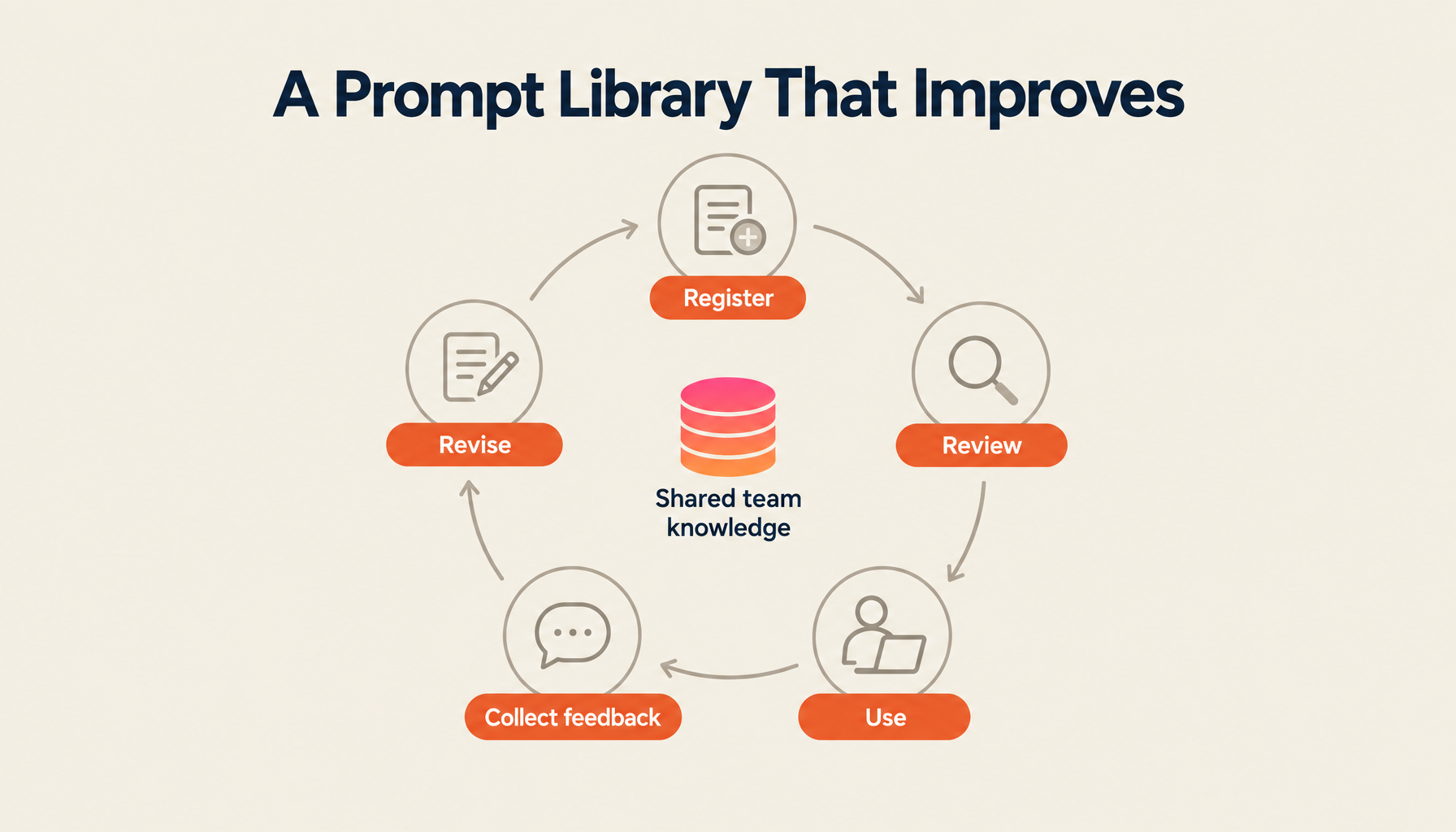
A prompt library is never "done." Run a monthly cycle:
Monthly review agenda (30 minutes):
- Review newly registered prompts and quality check (10 min)
- Usage review — what got used a lot, what didn't (10 min)
- Improvement sharing — "accuracy improved when we changed this" (5 min)
- Set priorities for the following month (5 min)
Lakera's 2026 guide recommends prompt reviews happen not just when problems occur, but at minimum quarterly. AI models update, and when they do, prompt behavior changes. Don't let the library go stale.
Best Practices for Prompt Sharing
Here are five ways to prevent a prompt library from going unused after it's built:
Share success stories with specific numbers
"This prompt cut report creation from 2 hours to 30 minutes." Concrete numbers like this are the most effective driver of adoption. Share regularly in all-hands meetings or a dedicated Slack channel.
Embed it in new employee onboarding
Include "How to use the prompt library" in the onboarding curriculum. IONOS research reports that standardized prompt templates reduce the time for new employee ramp-up and contribute to error reduction.
Designate a "Prompt Champion" in each department
Appoint one person per department to drive prompt collection and improvement. Rather than making it everyone's job, creating a dedicated champion generates momentum.
Use variables to improve reusability
Making fixed portions of a prompt into {variables} makes it easy to reuse across different contexts:
You are a {role} in the {industry} industry. Explain {topic}
to {audience} in approximately {word count} words.
Avoid jargon and include at least two concrete examples.
Minimize friction for feedback
When someone spots something to improve, they should be able to give feedback immediately. Slack reactions, comment functions on the prompt page, a simple Google Form — anything works, as long as the barrier is as low as possible. A library without feedback doesn't grow.
Governance for Maintaining Prompt Quality
When managing prompts at an organizational level, governance mechanisms are necessary.
The registration flow for new prompts works like this: the creator submits a prompt → the department's Prompt Champion reviews it → the review checks four things: no confidential information included, naming conventions followed, output example attached, target model specified → if all clear, approve and publish to the library; if issues are found, send back with a correction request.
Also document prohibited practices explicitly:
| Prohibited Practice | Reason |
|---|---|
| Registering prompts containing personal data | Privacy violation |
| Registering prompts with specific customer names | Data leak risk |
| Prompts designed to elicit discriminatory or biased output | Compliance violation |
| Prompts that violate licensing or terms of service | Legal risk |
| Production use without testing | Quality risk |
Choosing the Right Tool
Where to build the prompt library is also an important decision:
| Tool Type | Pros | Cons | Best For |
|---|---|---|---|
| Spreadsheet | Zero cost; everyone can use it | Poor searchability; version control is hard | Teams of 10 or fewer |
| Notion or Confluence | Flexible structure; collaborative editing | Not AI-specific; search accuracy limited | Mid-sized teams |
| Dedicated prompt management tool | Version control, A/B testing, audit logs | Cost; learning curve | Engineering teams |
| AI knowledge platform | AI search; prompt management and execution integrated | Initial implementation cost | Organizations driving company-wide AI adoption |
ZEROCK is an AI knowledge platform with built-in prompt library functionality. It handles prompt saving, search, and sharing — but it also lets you run AI searches against your internal data directly from the prompt, without switching to another tool. Management and use are integrated on a single platform, so there's no "I found the prompt, now I have to open a different tool to use it." In my view, that integration is ZEROCK's most distinctive strength.
Summary
The question I get most about prompt library construction is: "How many prompts do we need before we can launch?" My answer is five. Five is enough. Aiming for a perfect library before going live means you'll never go live.
Collect five prompts that have a reputation in your team as "genuinely useful." Put them in a shared folder. Let people use them and gather feedback. Naming conventions and category design can be refined from there. A sophisticated system can come later. Starting is what matters.
ZEROCK's Prompt Library Feature
ZEROCK is an enterprise AI platform that integrates prompt management, sharing, and execution. Category-based organization and search, usage visibility, and GraphRAG-powered AI search — all executable directly from a prompt. Data is managed in AWS Tokyo region, making it deployable even in organizations with strict security requirements.
For organizations looking to standardize team AI use, start with a materials request.
References
- IBM "The 2026 Guide to Prompt Engineering"
- Lakera "The Ultimate Guide to Prompt Engineering in 2026"
- Adaline "The Complete Guide to Prompt Engineering Operations (PromptOps) in 2026"
- IONOS "What is a prompt library? Explanation, benefits, and best practices"
- GLASS BLOG "AI Prompt Management: Efficient Organization and Sharing for Team Use"